Appearance
Generating Keys
To ensure the security of API interactions, all requests must pass RSA2 signature verification for identity authentication. Before using the SDK, please obtain the merchant-specific signature keys (public/private key pair).
I. Merchant Key Pair
1. Download the Key Generation Zip Package
Click to download sign-generator
2. Run the bat/sh File
Navigate to the sign-generator/bin directory
- For Windows systems, run the keygen_rsa.bat file; for macOS/Linux systems, run the keygen_rsa.sh file
- Generate two files in the same-level directory : public_key.pem (merchant public key) and private_key.pem (merchant private key)
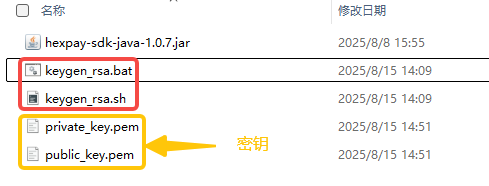
3. Upload the Public Key
- (Log in to the Merchant Management Backend → Go to Application Management → Select the corresponding App → Upload the application public key)

- Merchant Center — Application Management — Create/Modify: Paste the public key and click Save
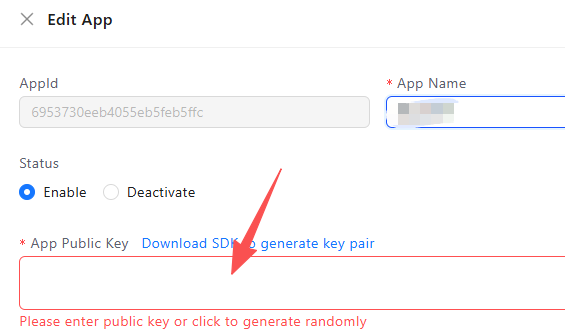
II. Platform Public Key
Platform public key: Used for response signature verification of asynchronous callbacks
Test environment:
text
MIIBIjANBgkqhkiG9w0BAQEFAAOCAQ8AMIIBCgKCAQEAhkHMIJMSZPwJ7BKpvRMj6fVjFaeDlVsAhB7HQaNXuzydDK9ahvKo3EH0Xq/q3SsLwLZbuN/9xfiUPCQmccFQBar2yxXfH2fvUWkU6F6R43VOQDkzrdenrCqZckGAZZnO5am2uo2O0PrvDp4vpqxORO3fb1peJNPjnX1fCJcn5vfGE2ZA3Ztds5VdKZPdCE5obLSVguKDzoRXuT9rNezsPKeQjhNcFj8B6lamKtyGWL8Ap8ATYImsD7xeIbNXgnjM2qhmnMr59P8KoXdpS7q2Hzz8xgmBVzaqnpM4G1QE+D501kw1G+y76N9XN6HgotGTxjHU8CQ8Ya1mnsRGA+n+RQIDAQABProduction environment:
MIIBIjANBgkqhkiG9w0BAQEFAAOCAQ8AMIIBCgKCAQEAxd1a6lKspgT64oU16FHkoI8UnM04bBwStSlfdziAmIXfIF6YIeQrSOqr+iFI44l86v0ANm/UrP/O7cJUOHlO2xzMiA6DCAS9MU+XeBl+YB1kr55TccaFp4PtJuf3MTchnhjPrgOF1Gm41Tinrzwo0G/eq4SjEIja8GZzKr/F/zRNi0UJdtypBMXQRI0jXMGLTqus92XMiHULSeMkKq7c9y+UvyYqz6+IkKIyX+jTtZLnS5Hi2y4305frvUy+60jRY/l/Vr57BtmgvM4zqjlstPDD3R3aKZjBGiy/im27XnkLzRim7S02CcuBo/QVo/vbj+bPc8TfLuhrBQY4T7osfwIDAQABNote: This public key is for temporary debugging only (currently valid) and may change. Please obtain the latest public key through the backend interface or merchant platform.